Audit log
Tier: Enterprise
Audit log is one of the Passwd’s features that helps enhance overall security and smooths the way for GDPR and SOC 2 compliance. User and group permissions enable you to set restrictions, but auditing informs you about what actions your team members actually perform.
What’s an audit log?
Auditing is a chronological and security-relevant set of records that tracks events and changes. In other words, auditing gives the admin the tool to monitor the activities of the users. GCP project admins (the person who created the project and participated in the installation) can access the audit log in the Logging section of their Passwd project in the Google Cloud Platform administration.
Go to your Google Cloud Platform administration > Your Passwd project > Logging section

How to search logs
Every audit record is a structured log entry. The message starts with the action name in square brackets, for example [secret-detail]. The same action name is also in the jsonPayload.action field. You can filter the log by the action, by the ID of a record, or by the e-mail address of a user.

jsonPayload.action="secret-detail"
jsonPayload.secretId="T0oBIynjHvKzf09is4aV"
jsonPayload.email="john.doe@example.com"
jsonPayload.denied=true
The older message filter still works:
jsonPayload.message="[secret-detail] User requested detail of the secret"
A refused action has the same action value as the successful one, with denied: true. A filter on jsonPayload.action alone now also matches the refused attempts and attempts on a record that does not exist. Add NOT jsonPayload.denied=true to the filter when you want the successful actions only:
jsonPayload.action="secret-detail" AND NOT jsonPayload.denied=true
What the logs tell you
You’ll find all the details of the log after clicking on it. The audit log never contains the value of a secret: no passwords, notes, keys or card numbers. It contains the ID and the title of the record, so you can recognize the record in the list. All audit records are stored in your GCP project that only you can access.
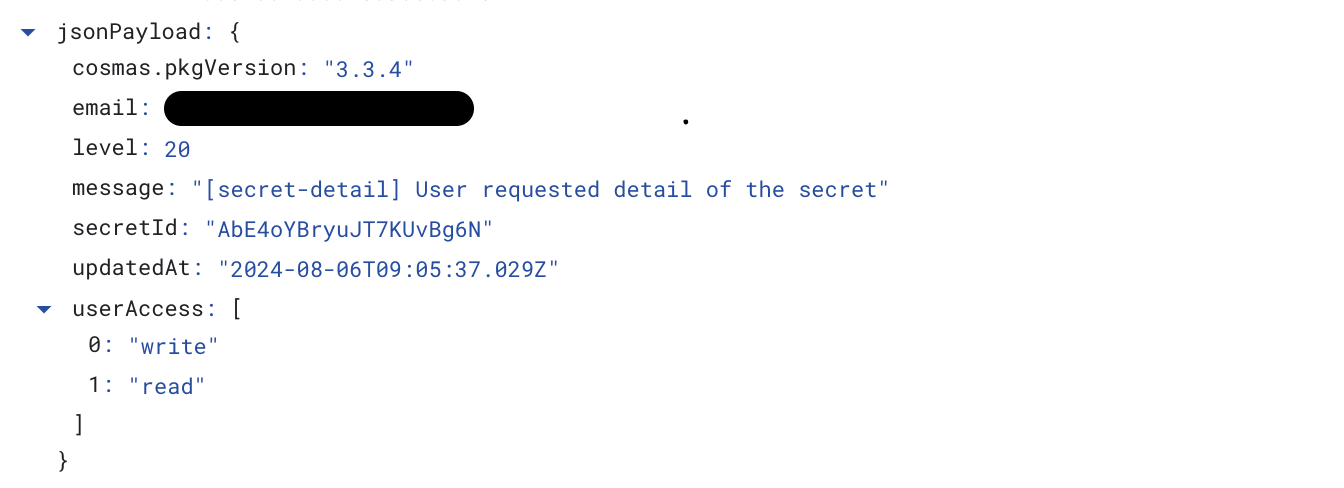
Fields in every record
| Field | Meaning |
|---|---|
action | The action name, see the list below. |
email, userId | The user who made the action. Empty for an anonymous visitor of a share link, then anonymous is true. |
platform | The client that sent the request: the browser extension, the mobile app, or api for the Public API. Empty when the client does not send it. |
ip, userAgent | The network address and the user agent of the client. |
intent | Why the client loaded the record, for example reveal or copy. Only when the client sends it. |
apiKeyId, apiKeyName | The API key that made the request, or the API key an api-key-* action is about. |
denied | true when Passwd refused the action. errorCode holds the reason. |
Record actions
| Action | Extra fields | When |
|---|---|---|
secret-create | secretId, secretName, source | A user creates a record. source is import for an imported record. |
secret-detail | secretId, secretName | A user opens a record. Reveal and copy load the record the same way. |
secret-update | secretId, secretName, secretNameOld, changedFields | A user changes a record. changedFields lists the changed field names, for example password, whitelistUsers or groups. Values are not logged. |
secret-delete | secretId, secretName | A user deletes a record. |
totp-detail | secretId, secretName | A user requests TOTP codes of a record. |
passkey-register | credentialId | A user registers a passkey. |
passkey-authenticate | secretId, credentialId | A user signs in with a passkey stored in a record. |
passkey-delete | secretId, credentialId | A record with a passkey is deleted. |
Sharing actions
| Action | Extra fields | When |
|---|---|---|
share-enable | secretId, shareId, until | A user creates or prolongs a share link. |
share-refresh | secretId, shareId, until | A user prolongs a share link from the shared page. |
share-disable | secretId, shareId | A user disables a share link. |
share-view | secretId, shareId | Somebody opens a share link. An expired link is logged with denied: true. |
share-totp-view | secretId, shareId | Somebody requests TOTP codes through a share link. |
Bulk and administration actions
| Action | Extra fields | When |
|---|---|---|
secrets-list | viewAsUserId, viewAsGroupId, adminFullView | An admin lists records as another user or group, or in the admin full access mode. A normal listing is not logged. |
secrets-import | created, updated, deleted, failed, replaceAll, vaultId, aborted | A CSV import finishes. Every imported record also has its own secret-* entry. An import that stops on an error is logged with aborted: true and the counts so far. |
secrets-export | count, vaultId | A user exports records to CSV. |
secrets-delete-all | count | An admin deletes all records. |
tag-update | tagName, tagNameOld, count | An admin renames a tag. |
tag-delete | tagName, count | An admin deletes a tag. |
group-hide | groupId, count | An admin removes a group from all records. |
group-show | groupId | An admin makes a hidden group visible again. |
settings-update | changedFields | An admin changes the organization settings. |
Account actions
| Action | Extra fields | When |
|---|---|---|
login | A user signs in with Google. A failed sign-in is logged with denied: true. | |
api-key-create | apiKeyId, apiKeyName | A user creates a Public API key. |
api-key-update | apiKeyId, apiKeyName, changedFields | A user renames a Public API key. |
api-key-delete | apiKeyId, apiKeyName | A user deletes a Public API key. |
api-key-authenticate | A request with an invalid Public API key was refused. Always denied: true. |
The logged data can be later used to trail activity and generate overview reports using API. But the audit log in Google is a nice and simple tool to monitor what’s actually happening with your sensitive data.